After so many years , I am coming back with a new post. Times have changed, Now there are some good videos on scilab image processing. Let me share one for you.
This is the first of a two part video secure series.Please feel free to comment.Tuesday, June 22, 2021

Sunday, June 2, 2013
We have to make Scilab stronger for image processing!!! So please contribute your EFFORT.
The need for advanced code in SCILAB for image processing applications is strongly felt. The only solution to this is community(students teachers and researchers) post their useful innovations as well as needs in SCILAB image processing as comments.
Code examples are welcome Also request for specific applications are welcome and I hope that it will be addressed by community.
Also it will be nice if teachers guiding projects of students would take care to address the needs in this area and ask their students to do at least one project in developing a module for scilab. I would be very glad to give the links to scuch projects and code in this blog.
Also innovative students can contribute a lot in this.
Code examples are welcome Also request for specific applications are welcome and I hope that it will be addressed by community.
Also it will be nice if teachers guiding projects of students would take care to address the needs in this area and ask their students to do at least one project in developing a module for scilab. I would be very glad to give the links to scuch projects and code in this blog.
Also innovative students can contribute a lot in this.
SCILAB is ours!! make it feature rich!!
Sunday, October 28, 2012
SIVP on LINUX UBUNTU
Many people has reported problems in loading SIVP on ubuntu.
Please see the discussions in http://mailinglists.scilab.org/SIVP-amp-Ubuntu-td4025059.html
I feel we will have to wait till the error is fixed
If anybody have any suggestions regarding this error please comment.
regards
Kannan
Please see the discussions in http://mailinglists.scilab.org/SIVP-amp-Ubuntu-td4025059.html
I feel we will have to wait till the error is fixed
If anybody have any suggestions regarding this error please comment.
regards
Kannan
Thursday, April 19, 2012
SCICBIR A CBIR system based on scilab
Content based image retrieval(CBIR) is an emerging area of research. Retrieving similar images from a given image has many applications in science engineering and medicine.
In scicbir i have provided a basic CBIR system in SCILAB.Please feel free to experiment with this system and develop further systems in SCILAB.
The source code is available at.
http://sourceforge.net/projects/sccilabcbir/

In scicbir i have provided a basic CBIR system in SCILAB.Please feel free to experiment with this system and develop further systems in SCILAB.
The source code is available at.
http://sourceforge.net/projects/sccilabcbir/

Thursday, April 12, 2012
Cropping an Image in SCILAB
When cropping an image , we select a part of the image we want and remove the rest.
You can crop an image using imcrop method in SIVP.
the format is imcrop(image,[x,y,width,height])
(x, y) is the top-left corner of the rectangle. Width and height are the width and height of the subimage.
Let us see what happens when we crops the image z below.

z1=imcrop(z, [95, 20, 440,220]);
imshow(z1);
The result is:

Friday, April 6, 2012
Edge detection in SCILAB image processing
The SIVP toolbox provides for the common edge detection algorithms.The main methods provided are the frollowing.
edge(im, method)
edge(im, method, thresh)
edge(im, method, thresh, direction)
edge(im, method, thresh, sigma)
[im1, thresh] = edge(im, method, ...)
This works for gray scale images.
Let us see an example.
 z=imread('C:\Documents and Settings\Administrator\Desktop\Images\image06.jpg');
imshow(z);
z1=rgb2gray(z);
imshow(z1);
E = edge(z1, 'sobel');
Also the canny edge detection method is supported. It is also to be noted that the SIP toolbox also supports edge detection like this.
z=imread('C:\Documents and Settings\Administrator\Desktop\Images\image06.jpg');
imshow(z);
z1=rgb2gray(z);
imshow(z1);
E = edge(z1, 'sobel');
Also the canny edge detection method is supported. It is also to be noted that the SIP toolbox also supports edge detection like this.

Saturday, March 31, 2012
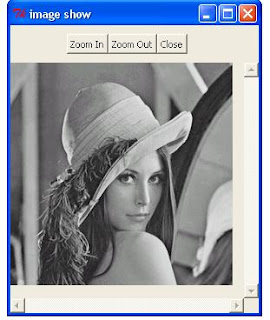
Converting RGB images to gray scale images.
RGB images can be converted into gray scale images in SCILAB by usibg RGB2gray
x=imread('C:\Documents and Settings\Administrator\Desktop\Images\lena.jpg');
imshow(x).
 z=RGB2Gray(x).
imshow(z).
z=RGB2Gray(x).
imshow(z).


Friday, March 30, 2012
Thursday, March 29, 2012
Reading an image in SCILAb
 The imread command is used to read an image into SCILAB (Remember that SIVP must be loaded).
Z= imread('C:\Documents and Settings\Administrator\Desktop\images\lena.jpg');
will read the image into a matrix Z.
If the image is colour image,The size will be something like.
256. 256. 3.
here 256x256 is the size of the image. And the matrix will be composed of three 2D matrices each of dimension 256x256, representing the RGB values.

Sunday, March 25, 2012
Montage in Scilab
To create a montage ,just store the urls of the images into an array (say z1). and call the following
[z2,x2]=montage(z1,[500,500],5)
Here 500,500 is the size of the new image formed as a montage,and 5 is the number of images per row.
x2=0 if the process is a success.
Now if you call imshow(z2) you will get the image displayed on the screen.
Now feel free to use the code below under GNUGPL.
Note that SIVP / SIP toolboxes are required for this.
Code Developed by Dr.Kannan Balakrishnan,Department of computer applications,Cochin University of science and technology,cochin-22,India
Also in case of any doubt or clarifications,please feel free to mail me at mullayilkannan (at) gmail.com
function [Frame ,x]=deposit(Frame,Im,x1,y1)
//deposits an image Im in a frame Frame,starting from(x1,y1)
//disp("deposit called/n/n",x1,y1)
t=size(Im)
r=size(t)
if(r(1,2)==2)//greyscale image
I=zeros(t(1),t(2),3)//convert to RGB
I(:,:,1)=Im
I(:,:,2)=Im
I(:,:,3)=Im
else
I=Im
end
//xtemp =size(I);
//print("Size of the image, I");
//disp(xtemp);
[a1,b1,c1]=size(I);
b=size(Frame)
if(a1+x1-1)>b(1)
print "frame size exceeded in function deposit" ;
x=1;
return
end
if(b1+y1-1>b(2))
disp('frame size exceeded in function deposit');
x=1;
return;
end
printf("OKAY");
stacksize(80000000);
//Frame(x1,y1,1)=0.5;
z=zeros(a1+1,b1+1,3);
z(1:a1,1:b1,1:3)=I;//this step is needed to comvert I to a matrix
//of ordinary numbers instead of 0..255
//imshow(z);
m1=max(z);
z=z/m1;
Frame(x1:(x1+a1-1),y1:y1+b1-1,1:3)=z(1:a1,1:b1,1:3);
x=0;
endfunction
function [Frame, x]=resizeAndDeposit(Frame,I,x1,y1,rowsize,columnsize)
//make a copy of the image I resized into rowsize x columnsize and places that in the prescribed position
Z=imresize(I,[rowsize,columnsize],'bicubic')
[Frame,x]=deposit(Frame,Z,x1,y1)
endfunction
function [Frame,x]=montage(Imagearray,Framesize,ImagesInRow)
//here imagearray is an array of imageurls
//framesize is of the form[rows,columns]
//imagesInRow is an integer corresponding to the number of images in a row
//x=0 if the operation is sucessful else 1
var1=size(Imagearray)
nImages=var1(1)//number of images
disp(nImages);
nrows=round(nImages/ImagesInRow+0.49) ;
ncols=ImagesInRow;
disp([nrows,ncols])
Frame=zeros(Framesize(1),Framesize(2));
Imagedim1=round(Framesize(1)/nrows)
Imagedim2=round(Framesize(2)/ncols)
//disp([Imagedim1,Imagedim2]);
count=1;
posx=1;
posy=1;//current x and y positions
for(i=1:nrows)
for(j=1:ncols)
t=imread(Imagearray(count))
//count=count+1;
//disp("**************************************")
//disp("posx:",posx,"posy:",posy,"count:",count);
//disp("**************************************")
;
[Frame,x]=resizeAndDeposit(Frame,t,posx,posy,Imagedim1,Imagedim2)
clear t;
posy=posy+Imagedim2
count=count+1
disp(count);
if(count>nImages)
return;
end
end
posy=1
posx=posx+Imagedim1
end
endfunction
Thursday, March 22, 2012
Welcome To Image Processing In SCILAB
Sci lab is a powerful open source software for scientific computation. In this Blog We will discuss the image processing capabilities of SCI LAB.
Subscribe to:
Posts (Atom)